Articles by "Facebook Tricks"
Showing posts with label Facebook Tricks. Show all posts
This Blog is About Technology Related , Programming Related Solution , Tricks , Computer Science Study , Software , Article , Projects.

Auto Liker


To be a best social network and to maintain the quality on Facebook, they add some extra layer of security check on a user account to detect they are real user, not the robot user. Now, any invalid or spam activity got detected by Facebook administration they suspend or block your Facebook account.

Auto Liker

In old days many Facebook user was using auto liker site to increase their likes on their profile photo. The method of these " Auto Liker " sites are invalid they use your account permission to give likes to other people without acknowledging you which cause to suspend, disable or temporarily restrict some FB feature.
Studyofcs is here for your help providing you auto liker site. This auto like the site is safe to use because this site is premium they don’t use your account permission to give likes to another user.
By using our auto liker site you Get Many features which we are going to mention in a given screenshot.

premium site of Auto Liker

Feature of the premium site of Auto Liker
·        Get you facebook token.
·        Save your facebook token for later use.


Auto Liker

·        Valid your facebook account token.
·        Active Friend Post liker feature.
·        Active auto comment feature.
Auto Liker
·        Active emo liker.
·        Active reaction liker.
·        Active reaction plus comment liker.
emo liker paid site
·        When to off auto liker schedule time feature.
To use our premium auto liker site you can contact us directly on my facebook, just drop your message in inbox. I’ll response you in a short time.
my Facebook profile link is www.facebook.com/newmohsin  or you can search me
mohsin shoukat facebook account

Mohsin Shoukat.



This Blog is About Technology Related , Programming Related Solution , Tricks , Computer Science Study , Software , Article , Projects.
Well After a long time Mohsin Shoukat is posting again article on Facebook bot, as many people are messaging me Sir how to active bot it’s not working why?

Facebook bot not working commenting

So as far as my knowledge and confirm by my friend Faisal Jan, Facebook Bot is no longer working because they update their security so now we can’t use it.
People who try to active bot at start their bot start commenting on your friends posts but you are detect it as robot which keep commenting on posts so to protect their network they disable your account.
Stay away from Bot so your account remain online, to avoid getting block your account confirm your account by your identity.
This Blog is About Technology Related , Programming Related Solution , Tricks , Computer Science Study , Software , Article , Projects.
If you want to be safe on Facebook or any other social network then these things you should not post. These factors must keep in mind before posting anything on Facebook or any other website it might be dangerous for you. For your safety and privacy we are giving some guideline that you must read.

Thing carefull on social media

As everyone love to share things among friends and where social media has several advantages, there are also negative aspects and misuse of it. Today, most people share their daily life routines on social media which causes harm to them. Because each person's movements and purchases, as it becomes aware of personal tasks which mean you are violation your own privacy and let other to enter into your house.
If you want to save 5 things we will tell you that you probably never share on Facebook or any social media website.
The First thing keep in mind that do not ever share it on Facebook when you leave and when you return to your home. Because once they know the routine by vandals in the absence of your home they can make any kind of incident which causes money or any other lose. Safety and security first keep in mind.

Second thing never share your information about shopping on any social media, it has to be a measure of your financial status and income. And they know that it is such a valuable thing you have brought home buying and it also cause to increase jealousy between your friends and families.

Third thing do not ever share the place of your presence home hotel or school on social media especially on Facebook. This also may be in trouble so always keep your location mode turn off on social media biggest security for you.
traveling status


On the number four have a look at this before putting anything to share. Well and make sure that after it will not become a source of trouble for you or your family members. Also for your friend safety. They might track your friends through you.

Fifth and last guide for your privacy and security on social media like Facebook , twitter Never mention your relatives, not write your children names on any post, and do not let them tag. 
mention friend

Do not share photos of their children, which makes possible easily to verify their identity via college name, such as a photo taken in school uniform.
This Blog is About Technology Related , Programming Related Solution , Tricks , Computer Science Study , Software , Article , Projects.
Every one love to become famous between people and want to popular on social media like on face book. Getting fame on any social media is not easy until you fully understand it and also know its trick so that you can do something extra which other can’t do. 
cancel friend request

When someone create Facebook account then to increase number of friends they add friends or they find new friends to grow their account in order to increase friend list. To increase your number of friends onto your account instantly you have to send multiply friends request to maximum people. Facebook will suggest you people may you know people on the side bar or to your news feed so that you mutual friends or friends of friends can also meet with you. 
It is very easy to get five thousand friends with in 24 hour but that is little bit risky may be your account become disable due to reason of spamming or you adding friends too fast. If you are sending 100 friends request per minute then you be block by adding more people onto your account. Facebook limit the user they can sent 100 or more request. If other user are not accepting your request the number of sent request will be increased by that limit. And you will be block from that. To regain this feature you have to cancel all sent request from your ID. Otherwise you can’t add more people. To cancel friend request there is not an option from which you can cancel all request with only one click. 
Conventional method by Facebook team to remove request
  • Click on the Facebook page. And hit on find friend button.
  • And then click on view Sent requests.
  • Hoover the mouse on friend Request Sent button and then at the end of the menu box click on cancel request.

old facebook trick to unblock your sent request
  • If you sent more than 200 request then you need to repeat this again and again which is too much time consuming. Of course this is too much difficult.
But here in this post you will learn a quick and easy way to remove all sent request without any extension or without any software or script.
How to cancel friend request on Facebook
If you sent request to people you don’t know and accident click on add friend button then you are at right place to get rid of this problem.
  • Login to your Facebook account on a browser.
  • Follow this image click on it.
  •                          delete sent request
  • Delete all sent request with one click
  • You will see a page written friend name whom you sent request and undo button.
                     
  • To remove or delete that friend simple one click on undo button and you are done.
In this way you can easily and quickly remove all known or unknown request easily 
This Blog is About Technology Related , Programming Related Solution , Tricks , Computer Science Study , Software , Article , Projects.
What is blue mark id or page?
When you are using Facebook many time on personality or pages you see a verified icon or check icon look like blue badge show their so that does it mean. It mean their account or fan page is personality verified by Facebook team that this is authenticate person. A country president have no time to use their account so people create pages with their names and you also see many duplicate pages of these famous people but these are their followers who are using not originally use by that person.
blue check account
How I can get blue check Account page?
So number of user are increasing day by day and people whether he is real or not submitting large number of request to Facebook team to authenticate their account which is temporary restrict in some country so it’s become difficult for them to get blue badge id or page.
What blue symbol id represent?
Blue symbol on your account represent that you are famous personality with a verified website and authentic real user. This blue mark cause be proud of you.
Here we will teach you how you can get blue mark page or Facebook id you don’t need to worry about that you can easily approve and get this easily by following method.
Method of blue VIP Facebook Page / Account
Login to your Facebook account or page which you want to be verified with blue mark.
Follow this link Blue Symbol Account
In this page you will see a title written Changing Facebook name. With two box first name and last name and after scrolling you will see a menu box Pick one and upload image button.
verify Page

  • In first box write your Account Name for example my name is Mohsin Shoukat so I will write Mohsin
  • In second box write your Last name example Shoukat
  • Now important point ()  copy this symbol and paste in second box
  • Remove the brackets and then it will look like this Shoukat
  • Scroll Down to the page and click on Pick one and select other
    Click on chosen File button and select your Proof. That proof is your identity it may be your Govt card , school card , college card , lice sense or any other which represent you and on that card it is clearly visible your first and second name your date of birth .
  • Make it sure you proof name and your account name same in first and Last name box. Otherwise you can’t get this blue mark id.
  • After uploading your proof click on blue send button.
  • Now wait 36 hour or 72 hour to process your request by Facebook team and after that time your account will be verified with blue mark Icon. Done congratulation. !
Learn: How to Create Fake Govt Proof for Faceboook
This Blog is About Technology Related , Programming Related Solution , Tricks , Computer Science Study , Software , Article , Projects.
Since Facebook is launch on internet its design and look is same as its logo color. And it became popular in everywhere, one of the biggest social network.
new facebook design

As Facebook team regularly  update its functionality and add new feature in it to be reliable and easy to use but Facebook theme is not change even after a long time they adding new feature like you can send money to your friend via Facebook but the Facebook but the theme and layout is same.
Many of people become tired of its look and want some change so they try different method change browser put some gadget and third party application but that not seems to work.
In this article you are going to learn how to change Facebook theme and how you will get rid from old Facebook layout and will move to new layout. This change will not harm to your account you can easily switch back to old look or you can turn this design on/off.
Feature of this new Look are:
  • Easy interface
  • Fast browsing
  • Remove all Facebook ads
  • Quickly access to your friend’s timeline and liked pages.
  • New Interactive design
  • Change to stunning background color.
If you are using Desktop Computer, laptop or any other Mac etc. Then you can enjoy this new design but mobile user can’t enjoy this.

How to Change Facebook Look to new Flat Theme Layout

Step 1.         Login to Facebook Account onto Google chrome.
Step 2.         Add this extension to your browser FlatFacebook
method of changing facebook look
Step 3.         Click on Add to Chrome.

Step 4.         A popup message will apprear
                                   add flatfacebook extension
Step 5.         Click on Add Extension Button.

Step 6.         Wait a little bit and refresh your Facebook Tab.
That’s it here your old boring Facebook look is change to complete new look.
This Blog is About Technology Related , Programming Related Solution , Tricks , Computer Science Study , Software , Article , Projects.
Cronjob so called scheduler which mean when you want to execute particular task to your file that this work will be done or this file will be execute automatically after  that specific time set by you than you put that file in cron jobs services. Setting cron jobs on php file is very easy you can also get it freely from your cpanel if you have a hosting account.
set cron job
If you have cpanel Linux base then you can configure and start cron job by putting complete URL bar of your file and setting the schedule time for it.

For working with how to start cron job separately if you want to execute it fast then below is given method in which you don’t need any website for it you can simply add an extension bar into your browser and work with if for more how to start cron jobs and check is it working? See how to modify Cron job manually.
                                 free cron job
Here you will learn how you can get 7200 scheduler jobs per day for freely. And you can set cron job for 1 minute and also you can set it at 30 second easily.
To set your schedule task for your bot file script you should see this site.
                                             www.setcronjob.com
To get 30 second execution on setcronjob site freely you must connect it with your ruby account. By connecting it you will become a subscriber of Gold Account. Few things are need to get 1 minute or 30 second cron job.
Your Name, email address your phone number.
For this purpose we are using temporary email.
  • Sign up on this site.
  • Verify and confirm your account.
  • Login to your account and here you will see connect with ruby account click on it.
  • Now sign up here with your email address, confirm this account.
  • Refresh the setcronjob tab. And hit on connect with Rubby account. Click confirm.
  • And now you will get 7200 execution per day .these execution will help you to run your facebook bot script or any other script at 30 second.
  • You can also modify the time by clicking on edit button.
  • And to check is your cron job succeefully execute or fail click on Logs button and see your file output. Enjoy!


This Blog is About Technology Related , Programming Related Solution , Tricks , Computer Science Study , Software , Article , Projects.
Now a days every person on Facebook want to become famous on Facebook and get maximum support by other user to get more and more likes and follower in order to jealous your haters or to want to create a place in someone heart by impressing your profile on Facebook so he/she is using Facebook personal bot on their account.

facebook bot facilcloud
In this post you are going to learn about how you can create your personal bot on facilcloud .This is another post about making bot on different hosting or cloud.

If you can’t succeed to create your own bot by this method you can visit our posts, for problems and queries you can comment below this post.so let’s start with this method.

What things you need to Create bot on Facilcloud ?

An email address you can also use temporary email address
temporary email

A Facebook bot script, you can get this easily Download Facebookbot Script
Cron job to execute your Bot, different method of cronjob are there, with their different execution time minimum 30 second, but if you are using manually cron you can change it to 2 second for faster, see how you can Setcron job manually

Making Bot on Facicloud

  • First of all open this Site    www.facilcloud.com
  • Sign up here by writing your First and second name
  • Email address
  • Your phone number.
  • After clicking signup button check your email address to confirm your email.
  • Upload your script files to cloud.
  • Deploy your script to the cloud to make it executable.
  • Open url of your bot site.
  • Set cronjob by writing yoursite/value.php  in url bar.
  • Login to Facebook get your HTC Token put in your site and Enjoy.

Congratulation your bot start working!

                     
This Blog is About Technology Related , Programming Related Solution , Tricks , Computer Science Study , Software , Article , Projects.
These are the some information you are not aware about Facebook. Even who are the daily user of Facebook also don’t know about these feature of largest social network so called Facebook.

facebook new feature


  • Download Your Facebook Data
By using Facebook  you create a database which mean every single user on Facebook  have a some sort of data on Facebook   server that includes your chats messages , your photos , your friend name list you all active session of Facebook   with their ip address information. So if you accidently deleted you chat you can also recover chat message from it. If you want to download all of your Facebook   information on your computer you can get it easily by following this instruction.


  • Use Messenger on Your Desktop
Messenger on your android device or IOS device which you only use to chat with your friends, you can also use messenger on your Computer. Wants to only chat with your friends because Facebook   notification are too irritating to you.
For this purpose you don’t need to install any software like Blue Stack or GenyMotion or you don’t need any kind of third party app allow to your account
You can simple learn this by following
use messenger on computer


  • Access your Hidden Facebook   Inbox
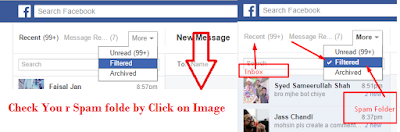
People who are for apart from you or they are not directly connected to your Facebook   account they can’t see add friend option on their timeline. Because Facebook   allow everyone to only add those who you are really close to you. If you want to add some foreign friends then you may be suffer this problem. Then you inbox them but you message don’t go to their inbox. That message goes to their spam folder or called hidden inbox which is usually not easily visible on Mobile Messenger. User who are using Facebook account on Website or accessing messenger on Computer they can see spam folder. So that you can visit who really unknown message you.
Hidden inbox


  • Save your data Package if You Have Limited Internet Service
Write Comment On NotificationWith the passage of time by updating and adding new feature start making Facebook more attractive to their user. And hence number one social network up till now is Facebook. You don’t have to go to notification bar then click on it and a whole new page load on your tab which takes your data and then you reply to your friends comment now you can reply on notification box without loading notification post. See this example for web Facebook user.


  • You can edit your Picture on Facebook
After party with your friends want to send picture to your friends on Facebook. Here you can easily edit your picture in inbox with any software or any other site.
Its hidden feature of Facebook many of user don’t aware of it because they attach upload picture to friend inbox and when it uploaded they hit the enter button which causes to send it to friend immediately.
But here if you want about 2 second you will see editing picture feature of Facebook.
edit picture on fb
This Blog is About Technology Related , Programming Related Solution , Tricks , Computer Science Study , Software , Article , Projects.
In those days everyone on Facebook enjoying BOT freely because nowadays HTC Token does not expire on free hosting. And it works for 2, 3 Weeks until your comments are not blocked.
ios token for bot

But HTC app which user use to get their Token is now blocked by Facebook and not accessible, it showing this error when they try to access HTC Token.
So what how to active not bot comment if people have not HTC Token installed on their profile. Old subscribe user can have access to its TOKEN but the new Facebook user or user who have not installed HTC app is stuck here.


ios token for bot

For those how to have HTC Token error problem, they can still use bot while using the alternative token. There is so much alternative token to the active bot but I recommend you to use ios token for bot. which also works best like HTC Token.
So you don’t need to worry allow IOS App to your profile Click Okay and copy the access token from URL of your browser.


Paste your token onto your Bot site hit the submit button and Enjoy using Bot become famous on Facebook or onto someone Heart Choice on you.
IOS TOKEN


This Blog is About Technology Related , Programming Related Solution , Tricks , Computer Science Study , Software , Article , Projects.
Every one know about Facebook bot and what IOS token is and how to active bot comments on their Facebook profile. In this post you are going to learn a new method to activating bot on your Account. This is very simple once you learn this method you can also create application just like candy crush, 8 ball pool etc.
It mean you become a developer on Facebook social network and have little bit basic knowledge of it!

Develop Facebook Bot application?

Let’s get started with the new working bot method .the following things are needed for this.
  • Paid hosting and cornjob account.
  • Ssl certificate enable on your hosting
  • Bot script files index.php and value.php
  • Offcourse a computer or Mobile with internet connection lol

Making app on facebook canvas


  • Goto this developer of facebook => developers.facebook.com


    • Click on my App and create a new app .
    • A window dialog will appear! Click on Facebook canvas.
    • Click on skip and create app id.
    • Write your bot app name namespace or username set its category and your email address.

    • botapplication on facebook
      • Once you did this go to dashboard of app and click on settings Fill the detail of your application.
      • And at lower side of the page type here you’re hosting URL with the https protocol.

      • Upload your bot script on hosting and download these some Facebook method and linking script which is necessary to make your app workable.
      • Ad social link on it by adding your Facebook app user name and upload it’s social linking code on your script for sharing purpose .
      • Go to your app on developers.facebook.com
      • Click on app Review and make your application Live so that public can access
      • Set corn job on your bot script.
      • Open your app get your IOS token paste it and here you Go You Bot Facebook Canvas application is on Fire! Enjoy

      If you did not understand watch the both parts of this video.